Every lead in Salesforce matters. Every customer record, every pipeline deal, every support ticket tied to a contact, that's real revenue sitting inside your CRM. Now imagine waking up one Monday and half of it is gone. That’s why DataArchiva for data backup for SMBs is necessary!
Your data is not hacked, not breached. Just gone because someone accidentally deleted a field, a bad data import overwrote records, or a rogue automation wiped out 3,000 contacts before anyone caught it.
This happens more often than people think, and for small and mid-sized businesses, the fallout hits harder. You don't have a dedicated Salesforce admin team running backups every night. You don't have an IT department to restore data within the hour. You've got a lean team, a fast-moving pipeline, and zero time to recover from a data disaster.
That's exactly why we built DataBakup for SMBs.
This blog covers the real risks of data loss that SMBs often face with Salesforce, why they should turn their attention to a dedicated Salesforce data backup solution for data protection, and how DataBakup is the best backup solution for growing businesses.
Salesforce Doesn't Back Up Your Data Automatically
This is the part that catches most SMB owners off guard. Salesforce does have data export tools, but they're manual, they're limited, and they are definitely not a replacement for real Salesforce backup for small businesses.
Get the detailed Salesforce Data Backup & Recovery Guide.
Here's what Salesforce's native options actually give you:
- Weekly data exports (not daily).
- No easy point-in-time restore.
- No automatic backup scheduling.
- No granular record-level recovery.
Backup, Recovery, & Protect Critical Salesforce Business Data with DataArchiva
Download the Datasheet!So if your sales rep deleted a batch of accounts two weeks ago and nobody noticed until today, you're not rolling that back with a native export. You're manually rebuilding it, if you can at all.
| Salesforce Native | DataBakup | |
|---|---|---|
| Daily automated backup | ❌ | ✅ |
| Point-in-time restore | ❌ | ✅ |
| Record-level recovery | ❌ | ✅ |
| Metadata backup | ❌ | ✅ |
| Compliance audit trail | ❌ | ✅ |
| Self-serve restore, SMB pricing | ❌ | ✅ |
According to Salesforce's own documentation, data recovery through their support team can cost upwards of $10,000 and take weeks. For an enterprise, that's painful but survivable. For an SMB, that's a business-threatening event.
Native vs. External Salesforce Backup: A Cost–Benefit Breakdown
Get the Free Datasheet in 30 SecondsThe Real Salesforce Data Loss Risks SMBs Face Every Day
Let's talk about where data actually disappears. It's rarely a dramatic cyberattack. It's almost always something way more boring and way more preventable.
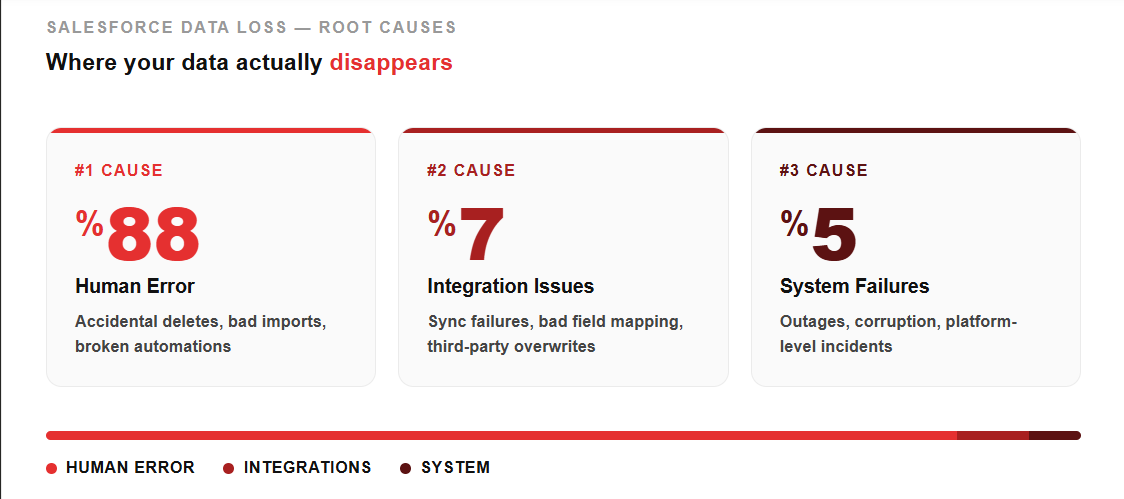
Human Error is the Number One Cause of Salesforce Data Loss
Studies show that 88% of data breaches and loss events are caused by human error (IBM). Inside Salesforce, that plays out as:
- Accidental mass deletions during data cleaning.
- Botched imports that overwrite existing records.
- Trigger or flow logic gone wrong at scale.
- A well-meaning admin is deleting a field that had 5 years of data attached to it.
US Legal Firm Took Complete Control Over Their Salesforce Data with Our Backup Application
Download the Case StudySmall teams move fast. Fast teams make mistakes. And Salesforce's recycle bin only holds records for 15 days, max.
Third-Party App Integrations Can Corrupt or Delete Your Data
When you connect marketing automation tools, ERP systems, or sync apps to Salesforce, you're opening a door for things to go sideways. A bad sync job can overwrite thousands of records in minutes. A misconfigured field mapping can blank out data across your entire org.
Ransomware and Insider Threats Are on the Rise for SMBs
Cybercriminals have shifted focus. Enterprises have layered security. SMBs? Not always.
60% of small businesses that suffer a cyberattack close within six months (U.S. National Cyber Security Alliance). Your Salesforce data is a high-value target, and without an automated Salesforce backup running independently of your main org, a ransomware event leaves you with nothing to restore from.
Before Your Data Disappears, Make Sure Your Backup Does Not
Explore the ProductWhy SMBs Are Underserved in Salesforce Data Protection
Until now, enterprise-grade Salesforce backup solutions were built for enterprise budgets and enterprise complexity. We're talking six-figure contracts, implementation timelines measured in months, and admin overhead that assumes you have a full Salesforce team.
SMBs got left behind. The tools were too expensive, too complicated, or built for orgs with 500+ users. So most small businesses were either doing manual exports nobody remembered to run, or just hoping nothing went wrong.
That's the gap DataBakup was designed to fill.
Introducing DataBakup for SMBs: Enterprise-Grade Salesforce Backup
DataBakup started as a Salesforce data backup solution for enterprise teams. It handled complex multi-org environments, massive data volumes, compliance requirements, the whole nine yards. But we kept hearing the same thing from SMBs: "We need this too, but we can't afford enterprise pricing, and we don't have the team to manage it."
So we built a version that fits how SMBs actually work. The same pricing, the same features, but now for SMBs.
Automated Daily Salesforce Backup With Zero Admin Overhead
Set it up once. DataBakup runs automatically every day, capturing a full backup of your Salesforce org, including objects, fields, files, metadata, and relationships. No one on your team has to remember to run it. No manual exports. Just a backup that's there when you need it.
Granular, Point-in-Time Restore That Actually Works
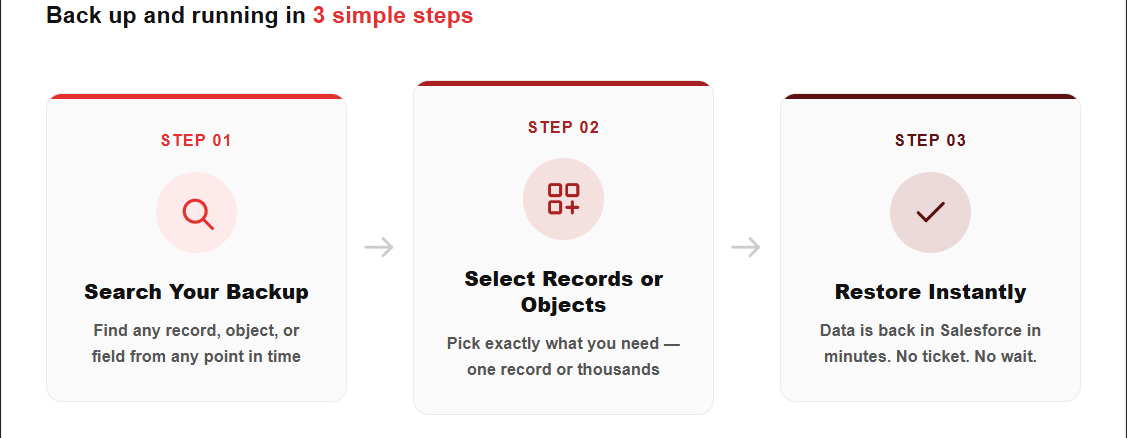
This is where most SMB-friendly tools fall short. DataBakup doesn't just give you a bulk export to sift through. You can restore individual records, specific objects, or your entire org to any point in time within your retention window. Sales rep deleted 200 contacts on Thursday? Restore just those records from Wednesday night in minutes.
Salesforce Data Recovery Without the $10,000 Support Bill
Forget filing a Salesforce support case and waiting weeks for a maybe. DataBakup puts Salesforce data recovery in your hands. Search, select, restore. That's it.
Affordable Salesforce Backup Pricing Built for SMB Budgets
DataBakup for SMBs is priced per Salesforce org, not per user. That means a team of 10 and a team of 50 can both protect their Salesforce data without the math turning into a budget problem. No enterprise contracts. No six-month onboarding. You're up and running in under 30 minutes.
What Salesforce Data Backup Compliance Means for Growing SMBs
If your business touches healthcare, finance, or any industry with regulatory requirements, your Salesforce data retention and recovery practices will be scrutinized. HIPAA, SOC 2, GDPR, and CCPA all have data availability and recovery components.
Having automated, documented Salesforce backup and recovery is not just good practice anymore. For many SMBs that are scaling, it is a requirement for landing enterprise customers or passing vendor security reviews.
DataBakup logs every backup and every restore event, giving you a clean audit trail you can actually show to customers, auditors, or partners.
Conclusion
Here's the honest math. If your sales team closes deals averaging $15,000 and Salesforce data loss costs you just 20 contacts from your active pipeline, that's potentially $300,000 in pipeline disruption. The smaller your team, the harder it is to rebuild that.
DataBakup for SMBs costs a fraction of that. And the cost of a single data incident, in lost deals, recovery time, and team morale, almost always dwarfs the cost of protecting your data upfront.
Get started with a free trial of DataBakup for SMBs today. Your first backup runs in under 30 minutes.